
Ouroboros, what is it?

The Razer Ouroboros is a wireless mouse with a 4G 8200 Dual Sensor. This means that the mouse has an optical and a laser sensor, both working together to give you a DPI of 8200. It works on 1000Hz ultrapolling which results in a 1ms response time. While that might sound fast for a wireless mouse, do remember that the average screens have an input delay of 5ms. You probably won’t notice any difference with this mouse or another one with a higher response time. Here are some other amazing facts:
- Up to 200 inches per second / 50g acceleration
- Approximate Size:
- Length: 122 mm to 137 mm (4.80″ to 5.39″)
- Width: 71 mm (2.80″)
- Height: 42 mm (1.65″)
- Approximate Weight:
- Without battery: 115 g(0.25 lbs)
- With battery: 135 g (0.29 lbs)
- Battery life: (Approx) 12 hrs (continuous gaming)
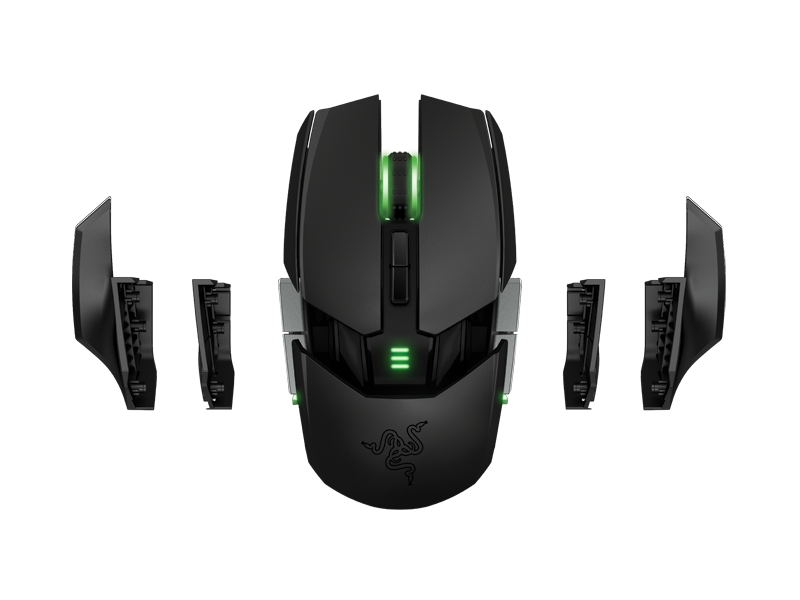
In the package
| 1 x Razer Ouroboros mouse | 2 x side panel flat set |
| 1 x braided USB cable | 2 x side panel wing set |
| 1 x recharging station | Manuals |
| 1 x rechargeable battery | Some promotional papers |
It has the 3 typical buttons (left click, right click and mouse wheel) with 8 other buttons that you can give other functions with the software. The package also includes 2 sets of interchangeable side panels: the winged set and the flat set. With the winged set, you create a resting place for your thumb and/or pinky finger. The flat set makes the mouse smaller, which might be preferable if you are a claw-mouse user. You can, of course, place a wing on the left side for your thumb, but use a flat piece on the left side. It’s completely up you. These side panels are very easy removable and, if you desire it, function as an extra button. The left and right click has a very nice feeling to it. It is a solid click and not the feeling of bending plastic. The same goes for the mouse wheel click. It just feels good when you use those buttons.

Besides the 2 sets of side panels, you have 2 other options to adjust the Ouroboros to your desires. At the underside of the mouse, there is a wheel and a button. With the wheel, you adjust the angle of the palm rest. The inclinations for that are small enough to find that perfect spot. The button allows you make the mouse longer or shorter. When fully removed, you gain access to the battery compartment. The battery is rechargeable from inside the mouse. So there is no need to keep an extra set of rechargeable batteries at hand.